This task refines an object classification shapefile produced by the DeepLearningObjectClassification task. If the initial result does not accurately identify features, this task lets you test and preview different parameter values. When the previewed result looks better, you can then output a new shapefile.
Example
Sample data files are available on our ENVI Tutorials web page. Click the "Deep Learning" link in the ENVI Tutorial Data section to download a .zip file containing the data. Extract the contents of the .zip file to a local directory. Files are located in the object_detection folder.
This example classifies an image using a trained object detection model that looks for parking spots with handicap signs painted on the pavement. It displays the initial result, then invokes the PostProcessObjectClassification task. It applies different CONFIDENCE_THRESHOLD and IOU_THRESHOLD values to improve the classification. Finally, it creates a new output shapefile.
e = ENVI()
RasterFile = 'C:\MyTutorialFiles\ImageToClassify.dat'
Raster = e.OpenRaster(RasterFile)
ModelFile = 'C:\MyTutorialFiles\ObjectDetectionModel_HandicapSpots.envi.onnx'
Model = ENVIDeepLearningObjectModel(ModelFile)
ClassTask = ENVITask('DeepLearningObjectClassification')
ClassTask.INPUT_RASTER = Raster
ClassTask.INPUT_MODEL = Model
ClassTask.CONFIDENCE_THRESHOLD = 0.4
ClassTask.IOU_THRESHOLD = 0.7
ClassTask.Execute
View = e.GetView()
Layer = View.CreateLayer(Raster)
Layer2 = View.CreateLayer(ClassTask.OUTPUT_VECTOR)
View.Zoom, /FULL_EXTENT
Next, zoom into an area with overlapping bounding boxes over the same feature. Enter these commands at the ENVI prompt in the IDL Console:
View.GoToLocation, 3114967.3777D,1765077.1140D, /MAP
View.Zoom, '400%', LAYER=Layer
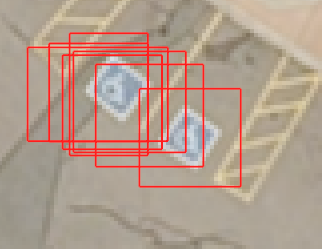
Invoke the PostProcessObjectClassification task with new threshold values:
Task = ENVITask('PostProcessObjectClassification')
Task.INPUT_VECTOR = ClassTask.OUTPUT_VECTOR
Task.CONFIDENCE_THRESHOLD = 0.8
Task.IOU_THRESHOLD = 0.1
Task.OUTPUT_VECTOR_URI=e.GetTemporaryFilename('shp')
Task.Execute
Hide the initial shapefile and display the post-processed shapefile:
Layer2.Close
Layer3 = ViewCreateLayer(Task.OUTPUT_VECTOR)
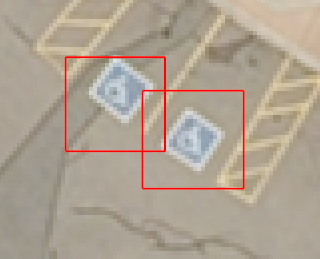
Syntax
Result = ENVITask('PostProcessObjectClassification')
Input parameters (Set, Get): CONFIDENCE_THRESHOLD, INPUT_VECTOR, IOS_FILTER, IOS_THRESHOLD, IOU_THRESHOLD, OUTPUT_VECTOR_URI
Output parameters (Get only): OUTPUT_VECTOR
Properties marked as "Set" are those that you can set to specific values. You can also retrieve their current values any time. Properties marked as "Get" are those whose values you can retrieve but not set.
Input Parameters
CONFIDENCE_THRESHOLD (optional)
Specify a floating-point threshold value between 0 and 1.0. Bounding boxes with a confidence score less than this value will be discarded before applying IOU_THRESHOLD. The default value is 0.2. Decreasing this value generally results in more classification bounding boxes throughout the scene. Increasing it results in fewer classification bounding boxes.
INPUT_VECTOR (required)
Specify the classification vector to be processed.
IOS_FILTER (optional)
Set this parameter to true to filter out bounding boxes that have an Intersection over Self (IOS) value larger than IOS_THRESHOLD.
IOS_THRESHOLD (optional)
Specify a floating-point value between 0 and 1.0, indicating the Intersection over Self (IOS) value. This parameter fixes any overlapping bounding boxes that remain after applying the IOU_THRESHOLD, particularly smaller boxes inside of larger ones. The default value is 0.8.
IOU_THRESHOLD (optional)
Specify a floating-point value between 0 and 1.0, indicating the Non-Maximum Suppression Intersection over Union (NMS IOU) value. This is a Deep Learning object detection parameter that reduces detection clustering by pruning predicted bounding boxes that have high IOU overlap with previously selected boxes. The default value is 0.5. Increasing this value results in more bounding boxes around identified features. Decreasing the value results in fewer bounding boxes.
OUTPUT_VECTOR_URI (optional)
Specify a string with the fully-qualified path and filename for OUTPUT_VECTOR.
Output Parameters
OUTPUT_VECTOR
This is a reference to the output vector.
Methods
Execute
Parameter
ParameterNames
See ENVI Help for details on these ENVITask methods.
Properties
DESCRIPTION
DISPLAY_NAME
NAME
REVISION
TAGS
See the ENVITask topic in ENVI Help for details.
Version History
|
Deep Learning 1.2
|
Introduced |
See Also
DeepLearningObjectClassification Task