Note: For updates to third-party libraries, see the IDL Release Notes inside the IDL installation.
New Features
Arrays up to 64 Dimensions
Previously, IDL supported arrays of up to 8 dimensions. Now, IDL supports arrays up to 64 dimensions. All routines that have a dimension argument or keyword will now support arrays with up to 64 dimensions. For example:
IDL> a = lindgen(2,2,2,2,2,2,2,2,2,4)
IDL> help, a
A LONG = Array[2, 2, 2, 2, 2, 2, 2, 2, 2, 4]
IDL> print, a.ndim, ": ", a.dim
10: 2 2 2 2 2 2 2 2 2 4
IDL> print, max(a)
2047
IDL> help, max(a, dimension = 10)
<Expression> LONG = Array[2, 2, 2, 2, 2, 2, 2, 2, 2]
For details see any routine that accepts dimensions, such as LINDGEN, FINDGEN, MAKE_ARRAY, TOTAL, MIN, MAX, SIZE, etc.
BigFloat for Arbitrary Precision Arithmetic
The existing BigInteger class lets you create integer numbers of an arbitrary length and perform various computations. The new BigFloat class provides similar functionality but for floating-point numbers.
The BigFloat class stores a single floating-point number as x = M · 10exponent where M is the mantissa stored as a BigInteger, and exponent is a long integer. The mantissa has a default precision of up to 30 digits (plus the sign), but this can be increased to a maximum of 1000 digits. The exponent can range from -1000000 to +1000000.
All math operations involving BigFloat numbers work by operating on the mantissa and exponent separately. Since all of the basic math operations for BigInteger are written in C code, these are highly performant. The BigFloat class and many of its methods are written in the IDL language. You can find the source code in the file lib/datatypes/bigfloat__define.pro in your IDL installation.
You can create BigFloats from regular numbers or from strings. For example, all of the following statements produce the same BigFloat value:
b = BigFloat(3.14d)
b = -BigFloat('3.14')
b = BigFloat(314, -2)
You can also use keywords to create BigFloats with special values. For example:
b = BigFloat(/infinity)
c = BigFloat(/infinity, /negative)
d = BigFloat(/nan)
You can use BigFloats in mathematical expressions in combination with other BigFloats, BigIntegers, or regular numbers. For example, let's compute the Rydberg constant:
IDL> fine_struct = 1 / BigFloat('137.035999177')
IDL> bohr_radius = BigFloat('5.29177210544e-11')
IDL> rydberg = fine_struct / (4 * BigFloat.pi * bohr_radius)
IDL> rydberg
10973731.5681425741417208047492
The BigFloat class has methods to compute the sine, cosine, exponential, logarithm (base 2, e, and 10), square root, and others. For more details see the BigFloat documentation.
CONGRID with Lanczos Smoothing and RGB Image Handling
The CONGRID routine lets you shrink or expand images. The routine has a new LANCZOS keyword which lets you choose a Lanczos sinc smoothing function. The Lanczos produces much better resampling results, especially when shrinking an array. CONGRID also has a new RGB keyword, which automatically handles three-channel or four-channel images by looping over the channel dimension and smoothing each channel separately.
For more details see CONGRID.
DIALOG_CALENDAR
The DIALOG_CALENDAR routine lets you create a standalone dialog that allows users to select dates from a calendar picker. The routine supports picking a single date, or a date plus a time, multiple separate dates, or date ranges. There are numerous keywords to control the behavior and appearance of the dialog.
For more details see DIALOG_CALENDAR.
Graphics Output to GLTF/GLB and Cesium 3D Tiles
IDL can now output object graphics hierarchies to the GLTF (Graphics Library Transmission Format) file format, along with an optional Cesium 3D Tiles file. GlTF (formerly known as WebGL Transmissions Format or WebGL TF) is a standard file format for three-dimensional scenes and models. A GLTF file uses one of two possible file extensions: .gltf (JSON/ASCII) or .glb (binary).
For example, for function graphics:
s = surface(/test)
s.Save, "mysurface.gltf"
For object graphics, construct a 3D model of a set of "buildings" of different heights, then export to a GLTF file:
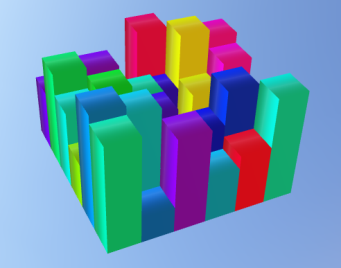
verts = [[0,0,0],[1,0,0],[1,1,0],[0,1,0], $
[0,0,1],[1,0,1],[1,1,1],[0,1,1]]
poly = [4, 0,1,2,3, 4, 4,5,6,7, 4, 0,1,5,4, $
4, 2,3,7,6, 4, 0,3,7,4, 4, 1,2,6,5]
oModel = IDLgrModel()
for i = 0, 5 do for j = 0, 5 do begin & $
color = bytscl(randomu(seed, 3)) & $
vert1 = float(verts) & $
vert1[0, *] += i & vert1[1, *] += j & $
vert1[2, *] *= 4 * randomu(seed) & $
oPoly = IDLgrPolygon(vert1, POLYGON=poly, COLOR=color) & $
oModel.Add, oPoly & $
endfor
oView = IDLgrView()
oView.Add, oModel
obj = IDLgrGLTF(filename='buildings.glb')
obj.Draw, oView
obj = 0
For details see IDLgrGLTF.
Tip: This file format is also available from both the function graphics Save method and XOBJVIEW.
Graphics Output to X3D Format
IDL can now output object graphics hierarchies to the X3D file format. X3D is a royalty-free ISO/IEC standards for declaratively representing 2D and 3D computer graphics using XML. The format is similar to VRML but is more modern.
For example, for function graphics:
p = plot3d(/test)
p.save, "myplot.x3d"
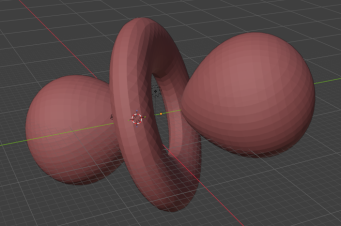
For object graphics, construct a 3D model of the dz2 shell for hydrogen, then export:
vertices = ex_spher_harm(polygons = poly)
oPoly = IDLgrPolygon(vertices, polygon=poly, color=[180,50,50])
oModel = IDLgrModel()
oModel.Add, oPoly
oView = IDLgrView()
oView.Add, oModel
obj = IDLgrX3D(filename='hydrogen.x3d')
obj.Draw, oView
obj = 0
For details see IDLgrX3D.
Tip: This file format is also available from both the function graphics Save method and XOBJVIEW.
HEAP_DEBUG Procedure
The HEAP_DEBUG sets a breakpoint on a heap variable (either a pointer or an object) using the heap variable ID. When IDL attempts to create a heap variable (either a pointer or an object) with the matching heap ID number, IDL will create the variable and then halt execution. This is useful when you are trying to debug an application that is leaking pointers or objects, and you know the heap ID numbers from the HELP,/HEAP command.
For details see HEAP_DEBUG.
IDL_GETPID Function
The IDL_GETPID function returns the IDL process' PID (process ID). The optional PARENT keyword causes the function to return the PID of IDL's parent process.
For details see IDL_GETPID.
READ_TEXTFILE
The new READ_TEXTFILE function provides a fast and convenient way to read all the lines of a text file into a string array.
For more details see READ_TEXTFILE.
SINC Function
The new SINC function computes the sinc, or sin(x) / x, of a scalar value or array. For example:
IDL> SINC([0, 0.5, 2])
1.00000 0.958851 0.454649
For more details see SINC.
TYPEMAX and TYPEMIN Functions
The new TYPEMAX and TYPEMIN functions return the largest and smallest values for all IDL numeric data types. For example:
IDL> types = [1,2,3,4,5,6,9,12,13,14,15]
IDL> foreach type, types do begin & tmin=typemin(type) & $
IDL> tmax=typemax(type) & print, typename(tmin), tmin, tmax & endforeach
BYTE 0 255
INT -32768 32767
LONG -2147483648 2147483647
FLOAT 1.17549e-38 3.40282e+38
DOUBLE 2.2250739e-308 1.7976931e+308
COMPLEX ( 1.17549e-38, 1.17549e-38)( 3.40282e+38, 3.40282e+38)
DCOMPLEX ( 2.2250739e-308, 2.2250739e-308)( 1.7976931e+308, 1.7976931e+308)
UINT 0 65535
ULONG 0 4294967295
LONG64 -9223372036854775808 9223372036854775807
ULONG64 0 18446744073709551615
For more details see TYPEMAX and TYPEMIN.
WebSocket Client
The HttpRequest class now has support for WebSocket servers, allowing IDL to act as a WebSocket client.
For example, assume there is a WebSocket server running on localhost port 8765 that just echoes any received data. Then in IDL you can do:
ws = HttpRequest.WebSocket("ws://localhost:8765")
print, ws.Receive()
ws.Send, 'Hello from IDL'
print, ws.Receive()
ws.Send, bindgen(10) + 1b
print, ws.Receive()
IDL prints:
Initial message from server
Echo: Hello from IDL
1 2 3 4 5 6 7 8 9 10
See HttpRequest for more details and examples.
Updates
Array Filter, Map, NestedMap, Reduce Functions Now Work with Lists
The IDL_Variable Filter, Map, NestedMap, and Reduce methods allows you to iterate over all elements of an array and call a user-defined function. This user-defined function can have zero or more extra arguments (in addition to the current value). In previous versions, these extra arguments needed to be either scalars or regular IDL arrays. Now, you can pass in scalars, array, or lists.
For example, construct an array of strings and a list of strings, then concatenate them together:
IDL> a = ['Arr1', 'Arr2', 'Arr3']
IDL> b = List('L1', 'L2', 'L3')
IDL> result = a.Map(Lambda(x, y: `${x} + ${y}`), b)
IDL> result
Arr1 + L1
Arr2 + L2
Arr3 + L3
Tip: We are also using a template literal string to do the concatenation.
For more details see the IDL_Variable Filter, Map, NestedMap, and Reduce methods.
FILE_ZIP/UNZIP Progress Bar
Both FILE_ZIP and FILE_UNZIP have a new PROGRESS_BAR keyword. Set this keyword to display a progress bar on the IDL command line:
IDL> file_zip,'myfolder','myfolder.zip',/progress
Zipping... 100.0% [########################################] xyz.pro
IDL> file_unzip,'myfolder.zip','myoutputfolder',/progress
Unzipping... 100% [########################################] xyz.pro
HASH::MAP Allows Access to Hash Keys
The Hash::Map method passes each hash value through a user-defined function or Lambda function. Normally, you do not have access to the hash key within the Map function, just the hash values.
If you set the new /KEYS keyword, then the hash key corresponding to each value will be passed in as the last argument to your mapping function. For example:
IDL> var = HASH("key1", "A", "key2", "B")
IDL> result = var.Map(Lambda('value,sep,key: key + sep + value'), "=", /keys)
IDL> result
{
"key1": "key1=A",
"key2": "key2=B"
}
See Hash::Map for details.
IDL Browser Widget
The IDL browser widget on Windows has been updated to use CEF 146. This brings Chromium improvements to IDL:
-
Security and stability improvements via multiple CVE patches.
-
Modernized JS, DOM, and CSS features and engine optimizations.
-
More performant V8 JavaScript engine.
See WIDGET_BROWSER for details on how to use the IDL browser widget.
IDL Package Manager Progress Callbacks
The IPM (IDL Package Manager) lets you create, publish, and install IDL and ENVI packages from a local or remote server.
The Publish, Install, and Update method have three new keywords: CALLBACK_FUNCTION, CALLBACK_DATA, and PROGRESS. The PROGRESS keyword lets you disable the command-line progress bar, which is normally on by default. The CALLBACK_FUNCTION and CALLBACK_DATA keywords let you define your own function to be called during uploads or downloads, so you can implement your own custom progress bar.
The Publish method has a new keyword, INCLUDE_DOTFILES. By default, files and folders that begin with a dot (".") are not included in the package. Set this keyword to include these files and folders.
For details see IPM.
IDL_String Methods No Longer Needs Parentheses
Previously, if you want to use one of the "dot" methods with a "raw" IDL string (not a variable), you needed to use parentheses around the string. For example:
IDL> a = "*"
IDL> print, a.dup(10)
IDL> print, ("*").dup(10)
Now, you no longer need to use parentheses around raw strings in order to use these dot methods. For example:
IDL> print, "*".dup(10)
**********
IDL> print, "IDL is fun!".strlen()
11
IDL> print, "a/b/c/d".split("/")
a b c d
TEXT and IDLgrText LINE_SPACING Property
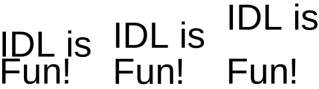
TEXT and IDLgrText have a new LINE_SPACING property that can be used to control the spacing for multiline text strings. Multiline strings are created by turning on formatting codes (/ENABLE_FORMATTING) and using the !C line break command within the string.
For example, for function graphics:
p = plot(/test)
t = text(0.5, 0.75, "$Here is a damped\nsine wave$", line_spacing = 2)
For example, for object graphics:
obj = idlgrmodel()
txt = 'IDL is!CFun!'
obj.add, idlgrtext(txt,/enable_format, line_spacing=0.75)
obj.add, idlgrtext(txt,/enable_format, line_spacing=1, loc=[0.25,0,0])
obj.add, idlgrtext(txt,/enable_format, line_spacing=1.5, loc=[0.5,0,0])
xobjview, obj, xsize=800, scale=2
For more details see TEXT and IDLgrText.
NetCDF can now Read and Write 64-bit CDF5 Files
The NetCDF routines can now successfully read and write NetCDF-3 files which are in the CDF5 format. The CDF5 format allows arrays which have dimensions greater than 4 billion. The NCDF_CREATE routine has a new NETCDF3_CDF5 keyword to create files in this format. For details see the NCDF Overview.
Python Embedded is now version 3.14
The embedded Python that ships with IDL and ENVI is now version 3.14. For more information see the IDL Python bridge.
Python Errors Now Include Traceback
Previously, when you used the IDL Python bridge, any errors would only report the top-level error message, with no stack information. Now, when an error occurs in the Python code, you will get the full traceback information, just as if you had run the code within Python itself. For example, using an older version of IDL:
IDL> np = python.import('numpy')
IDL> result = np.linalg.solve([[1,2],[2,4]], [1,2])
% PYTHON::_OVERLOADMETHOD: PYTHON_CALLMETHOD: Exception: Singular matrix.
% Execution halted at: $MAIN$
Now, with IDL 9.3:
IDL> np = python.import('numpy')
IDL> result = np.linalg.solve([[1,2],[2,4]], [1,2])
% PYTHON_CALLMETHOD: Traceback (most recent call last):
% File "C:\Program Files\NV5\IDL93\bin\bin.x86_64\idl-python\numpy\linalg\_linalg.py", line 452, in solve
% r = gufunc(a, b, signature=signature)
% File "C:\Program Files\NV5\IDL93\bin\bin.x86_64\idl-python\numpy\linalg\_linalg.py", line 145, in _raise_linalgerror_singular
% raise LinAlgError("Singular matrix")
% numpy.linalg.LinAlgError: Singular matrix
% Execution halted at: $MAIN$
For more information see the IDL Python bridge.
Running Covariance Matrix Mode
The RUNNING_COVARIANCE function now supports matrix mode for computing covariance and correlation statistics across all variable pairs in a MxN dataset. Pass a single MxN array instead of separate X and Y vectors:
IDL> data = randomu(seed, 5, 100)
IDL> result = running_covariance(data)
Tip: Use <Variable>.<TagName> (e.x. result.covariance) to access a 5x5 array of the desired statistic.
Additionally, The PREVIOUS keyword now accepts either a 7-element array ( while in vector mode) or an MxM array of structures (while in matrix mode) for continuing calculations from previous results.
For more details see the RUNNING_COVARIANCE function documentation.
Symbol Graphics Function - New ONGLASS Property
The SYMBOL function has a new ONGLASS property. Set this property to 1 to display the symbol on a plane facing the viewer, on top of all other graphics objects. This is useful to resolve draw order issues when using symbols on maps or other graphics layers.
WIDGET_DRAW - New Scrollbar Options
The SCROLL keyword to WIDGET_DRAW now lets you force scrollbars to always be visible. The possible values are:
-
SCROLL = 0: Scrollbars are disabled and will never be visible.
-
SCROLL = 1: Scrollbars are enabled and will automatically be added or removed.
-
SCROLL = 2: Scrollbars are enabled. The X (horizontal) scrollbar will always be visible. The Y (vertical) scrollbar will automatically be added or removed depending upon the dimensions.
-
SCROLL = 3: Scrollbars are enabled. The Y (vertical) scrollbar will always be visible. The X (horizontal) scrollbar will automatically be added or removed depending upon the dimensions.
-
SCROLL = 4: Scrollbars are enabled. Both the X and Y scrollbars will always be visible, regardless of the dimensions.
See WIDGET_DRAW for details.
WIDGET_TEXT - New YPAD Keyword
The WIDGET_TEXT function has a new YPAD keyword. Set this keyword to specify the vertical padding between the text and the edge of the widget.
WIDGET_TREE - New FRAME Keyword
The WIDGET_TREE function has a new FRAME keyword. Setting this keyword to zero will remove the default frame from the tree widget. This can be useful when embedding tree widgets within widget tabs or widget bases which might have their own frame.
See Also
See What's New (Previous IDL Releases) for an archive of What's New information.